
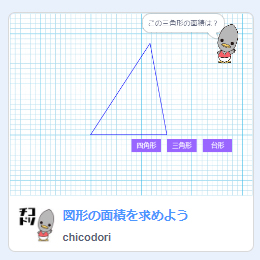
Build an Area Checker in Scratch

What is this activity?
Finish a Scratch starter project by building its area formulas. The starter’s answer checker is intentionally incomplete.
Let’s give it a try!
How to play
- Open the starter project and choose See inside.
- Combine green operator blocks and orange variables in the 答え合わせ checker.
- Run the project and test both correct and incorrect answers.
Use a computer for editing. The starter’s variables and feedback are in Japanese; their meanings are listed below. You can change the feedback to English in your own remix.
Translate a formula into blocks
In the starter project, choose the Chicodori sprite and find the block named 答え合わせ (answer checker). Fill its formula inputs with the matching green operator blocks and orange variables.
Programming writes multiplication as * and division as /. You can put one operator block inside another to build a longer formula.

| Variable | Meaning |
|---|---|
| たて / よこ | Vertical / horizontal side |
| 底辺 / 高さ | Base / height |
| 上底 / 下底 | Upper / lower parallel side |
Build and test
- Rectangle: vertical side * horizontal side.
- Triangle: base * height / 2.
- Parallelogram: base * height.
- Trapezoid: (upper side + lower side) * height / 2.
Run the project in full screen while testing. Check that a correct area receives correct feedback and an incorrect area does not. Return to the script if a test fails.
To keep your work, use File → Save to your computer. If Scratch opens in another language, use its language menu to choose English.
Scratch’s guidance on editing and mobile devices
For families and teachers
Learners turn a mathematical formula into a nested block expression. Ask them to test several known examples and explain how each expression calculates the area.
This English guide uses the original Chicodori Scratch project. Some labels remain in Japanese. You can explore and remix the project on Scratch.